Plant Instrumentation Software

Instrument Manager

Design plant instrumentation and automatically produce documents, including data sheets, bills of materials, loop and hookup diagrams, reports, and more.

Instrument Manager Plant Instrumentation Software

Instrumentation and Loop Diagram Software

A new "data-centric" Instrument design and documentation system. Used for the automated production of instrumentation documents such as, Instrument Data Sheets, Loop Diagrams, Hook up Diagrams, Wiring /Terminal Strip diagrams, Instrument Index report, Bill of materials report, Cables Schedule report, Interconnection reports and many other documents. Live linking with AutoCAD P&ID software.

Instrumentation or Control system design engineers. These Engineers will typically be working with PLC or DCS based control systems for continuous processes. The instrumentation, I/O and connectivity for these controls systems requires a significant level of documentation (eg datasheets and loop diagrams), all of which can be efficiently produced with Instrument Manager.

Compatible with AutoCAD, BricsCAD, GstarCAD, and LusoCAD. →
Features

Diagram Production

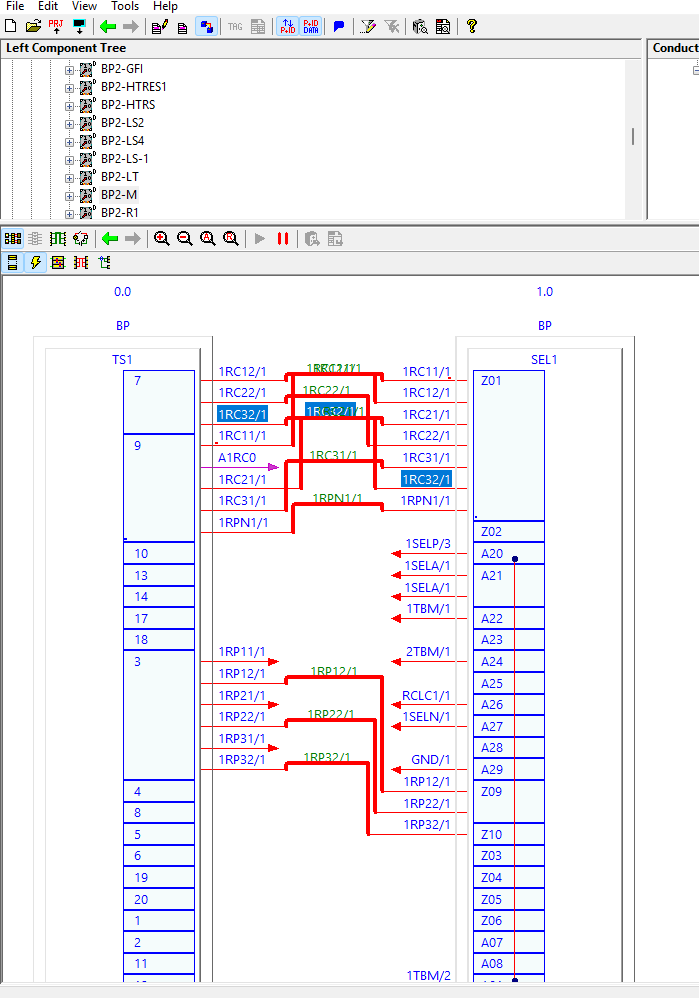
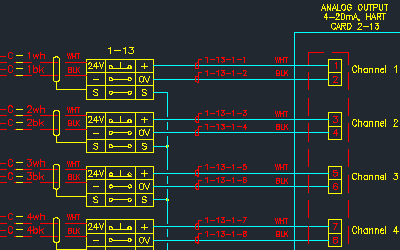
Generate loop diagrams and instrument drawings directly from your project database.

  • Automated production of Loop Diagrams and Hook-up Diagrams in AutoCAD format.
  • Automated production of Wiring and Terminal Strip diagrams in AutoCAD format.
Watch demo
Intro: Design
Intro: Design
Instrument Manager loop diagram

Document Production

Create and maintain datasheets, specifications, and reports with ease.

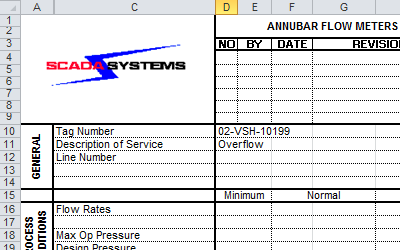
  • Automated production of Instrument Data Sheets (MS-Excel), Instrument Index, Bill of Materials, and Cable Schedule reports.
  • Automated production of wire and conductor/core interconnection lists, wire label/ferrule lists, and user-defined reports.
  • Automated project drawing index, materials quantity summary, tag name duplication cross-referencing, and warnings summary.
  • Project Management and Revision tracking, including revision comparison reports for all parts and connections.
Watch demo
Intro: Outputs and Reporting
Instrument Manager datasheet

Importing, Exporting, and Linking to AutoCAD P&ID

Bring in existing instrument data from common formats to eliminate re-entry.

  • Live-link an AutoCAD P&ID database (or other user component databases) with minimal effort, allowing Instrument Manager to access and modify P&ID data.
  • Import and export to most common formats — flat file, relational, and direct client instrument datasheet formats.

Database

Manage all your instrumentation data in one connected, auditable database.

  • Supports MS Access and SQL Server with largely user-definable table structures; designed for multi-user concurrent engineering.
  • Component, cable, and enclosure data from Elecdes single line and cable block diagrams is instantly available for inclusion in your Instrument Manager database.
  • Cable lists, components, and enclosures can be instantly shared with Paneldes for modelling, interference analysis, and cable/raceway routing.

User Interface

An interface built for instrument engineers, not generic database users.

  • Work in a familiar drag-and-drop explorer-style or tabular spreadsheet-style environment, with copy/paste, search and replace, filter, sort, increment, and other spreadsheet tools.
  • Folders represent containers for instruments and components; use client datasheets as data-entry forms.
Instrument Manager user interface

User Management

Control access across your team with role-based permissions.

  • Three permission levels: Administrators (manage users and advanced settings), Users (manage data and produce output documents), and Viewers (read-only access).

Data Specifications

Define and manage instrument specifications in a structured, reusable format.

  • Instrument data ratings and specifications maintained in user-definable per-instrument-type tables; all components are specification-capable.
  • User-definable WYSIWYG ( What You See Is What You Get ) instrument data sheets.

Template System

Build reusable document templates to speed up project delivery.

  • Most output documents and diagrams are template-based — appearance and data content under user control, using AutoCAD format for diagrams, MS-Excel for data sheets, and MS Access for reports.

Electrical Terminations and Links

Connect your instrumentation data directly to your electrical design workflow.

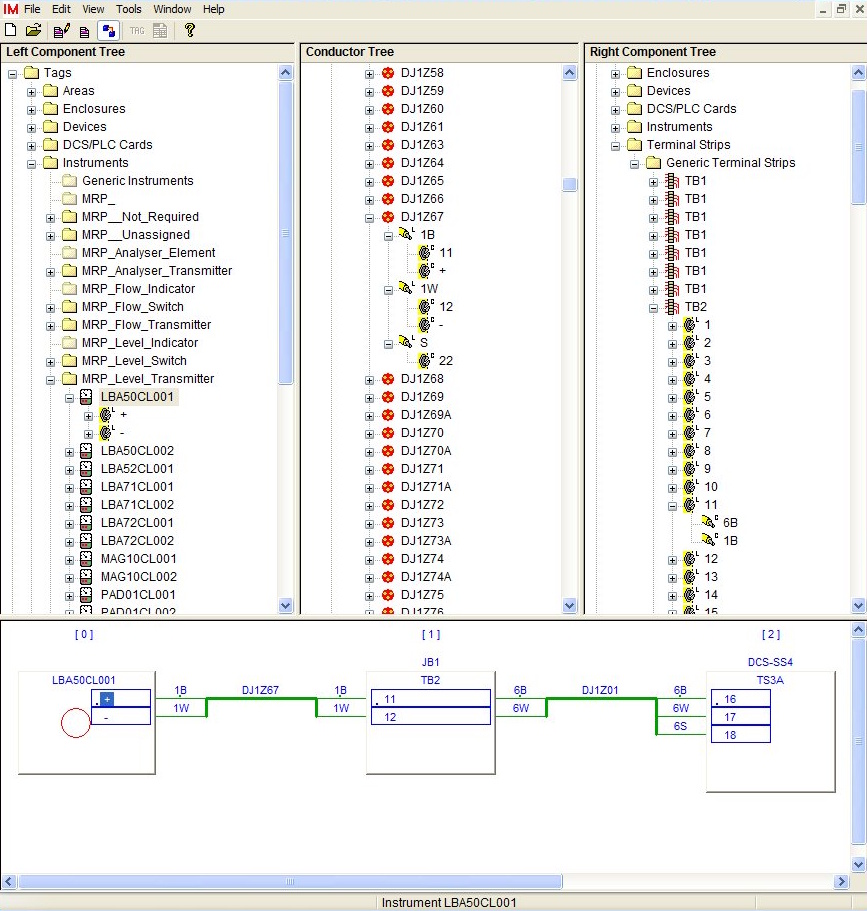
  • Associate components with areas, enclosures, and terminals via drag-and-drop; drag conductors or whole cables onto a terminal strip or instrument to make bulk terminations, with connections displayed graphically as they are made.
  • Instruments and catalog-based devices can be pre-allocated cable types, automated cable naming, and terminations — including adopted from catalog entries for components with valid catalog numbers.
Instrument Manager wiring diagram

Event Log

Track every change to your instrument database for full project auditability.

  • The Event Log records user nominated activities from user login/logout, to a component modification / deletion, to document printing or exporting. Events are logged with the activity, user and time data, in daily tables.

In-depth Support

Help when you need it, in the format that works for you.

  • 800+ help topics with step-by-step instructions and tutorial videos.
  • Tutorial videos, phone and email support, and training courses available.